How Flexport Built an AI Outbound Operating System
Morgan Williams explains Flexport’s AI outbound operating system for SDR research, account scoring, signal prioritization, and coaching inside Salesforce.

By Elric Legloire · EP 34 · Published October 9, 2026 · ~46m
In this episode
- What is Flexport’s AI outbound operating system?
- Remove non-revenue work before increasing activity
- How should SDR teams measure conversation quality?
- What is the difference between account score and account temperature?
- How do the two outbound gears work?
- How does Flexport predict who will answer a cold call?
- How should coaching change with prospect intent?
- How do you get SDRs to adopt an AI workflow?
- Chapters
- Resources mentioned in the episode
- Full transcript

Morgan Williams is Director of Sales Development and GTM Engineering at Flexport. His team completed 14 straight months above quota while Flexport raised the target twice, then reached 181.8% against the current quota in August.
This episode examines the AI outbound operating system supporting that performance. The available evidence does not establish that the system caused the attainment result. It shows how the team combined research, account and contact scoring, signal-based prioritization, call data, coaching, and rep adoption into one operating workflow.
What is Flexport’s AI outbound operating system?
Flexport’s AI outbound operating system is a set of research, scoring, prioritization, and coaching workflows connected through Salesforce.
A rep can launch account research from the CRM. The account moves through roughly 12 to 18 enrichments in Clay, then the relevant information returns to Salesforce. Account and contact scores show fit. Temperature reflects current engagement. A pickup-likelihood model adds another prioritization layer. The rep then moves selected contacts into Gong Engage or Trellus for outreach.
The practical idea is simple: keep the backend sophisticated while making the rep’s daily workflow easier to use.
Remove non-revenue work before increasing activity
Flexport started with a time study of the SDR day. Morgan found that reps were spending about two hours per day researching accounts and preparing before they could start conversations.
The first automation reduced that work to a button inside Salesforce. Morgan estimates that the resulting workflow brought research time closer to 15 minutes. The figure is his estimate, not an independently audited measurement.
Only after removing that work did the team layer in power and parallel dialers. The sequence matters. Faster dialing adds little when the rep still spends a large part of the day deciding who to call and gathering the same information by hand.
How should SDR teams measure conversation quality?
Morgan’s team measures meetings booked divided by decision-maker connects. Gatekeepers, wrong numbers, and wrong contacts stay out of the denominator.
The metric asks a cleaner operating question: when a rep reached someone who could say yes or influence the decision, how often did that conversation become a meeting?
The team then looks downstream at show rate and conversion into qualified pipeline. This requires reliable call dispositions, but it gives managers a more precise view than meetings booked or connect rate alone.
What is the difference between account score and account temperature?
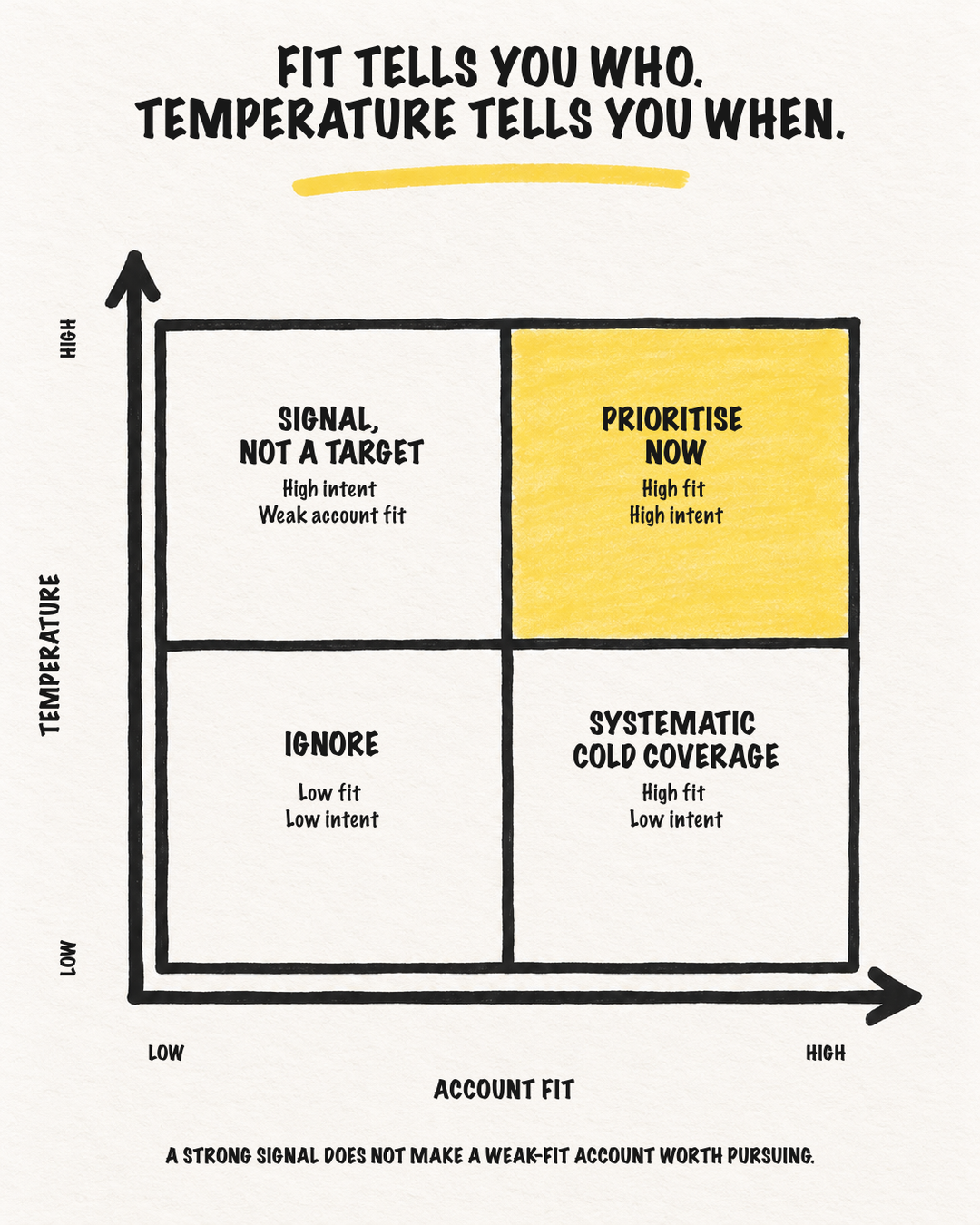
Account score measures fit. Account temperature measures current engagement and urgency.
Flexport calculates the two independently, then uses them together for prioritization. Temperature refreshes four times per day, and first-party signals carry more weight than third-party signals.
A company can show a strong signal and still be a poor-fit account. A strong-fit account can also be cold today and still deserve systematic outreach. The workflow first decides whether the account belongs in the market, then decides how much urgency the current signals deserve.
How do the two outbound gears work?
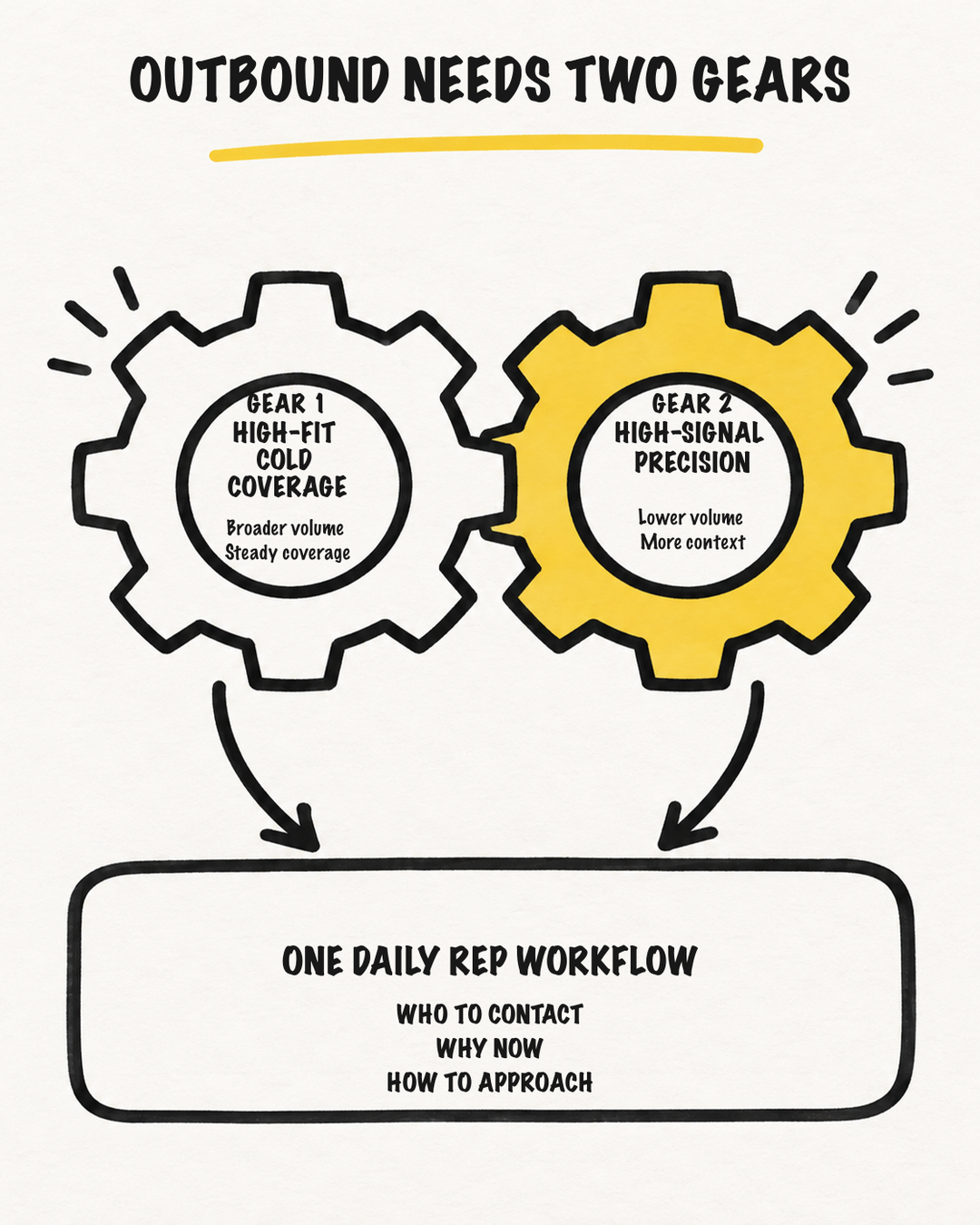
Flexport keeps two outbound motions active at the same time.
- Higher-volume cold outreach to high-fit accounts.
- Lower-volume, higher-precision outreach to accounts and contacts showing stronger signals.
Both motions appear in the Salesforce dashboard through the nets, spears, and seeds model from Predictable Revenue.
- Nets: the larger pool of high-fit accounts worked through segment-appropriate flows.
- Spears: warmer accounts and contacts showing first-party or third-party signals. Reps start here and use more context.
- Seeds: people who said “later.” Salesforce tasks return the follow-up to the rep at the right time.
Signals prioritize the motion. They do not replace account fit.
How does Flexport predict who will answer a cold call?
Flexport built a pickup-likelihood model from years of SDR call data already stored in its CRM.
The model evaluates 62 account and contact features, then assigns contacts to high, medium, low, or unlikely-to-pick-up tiers. It refreshes nightly using new contacts and recent call activity, then writes the result back to Salesforce.
The definition of success is important. Flexport trains the model on decision-maker connects, so gatekeepers do not inflate the pickup signal. The exact implementation depends on Flexport’s data and technical capacity, but the transferable lesson is to inspect the outcome history already in the CRM before buying another source of intent.
How should coaching change with prospect intent?
A cold prospect and someone who registered for a webinar start with different levels of familiarity.
For a cold account, the rep needs to establish who they are, explain why the call is specific, and lower the prospect’s initial resistance. Automated research gives the rep a business hypothesis to test without pretending to know what is happening inside the company.
A warmer prospect already has some familiarity, so the rep can move more directly into the relevant context. Flexport’s end-to-end dashboard lets managers diagnose whether the coaching issue sits in contact selection, pickup rate, conversation quality, meeting conversion, or a later stage.
How do you get SDRs to adopt an AI workflow?
Morgan treats behavior change as the hardest part of the build. Flexport pilots new workflows with a smaller group of reps, shows them how the output is produced, gathers feedback, and iterates before a wider rollout.
That creates co-authorship. Reps can inspect the source behind AI research, identify failure cases, and influence the workflow they will eventually use. Morgan’s adoption test is practical: once people complain that a system is broken, they depend on it enough to notice.
Chapters
- 00:00 Why this episode matters
- 00:55 Defining high-quality conversations
- 04:35 Remove non-revenue work first
- 08:50 Research from two hours to 15 minutes
- 10:50 One-click account research in Salesforce
- 15:10 Account score versus account temperature
- 18:00 Rep autonomy and experimentation
- 20:30 The two outbound gears
- 22:25 Nets, spears, and seeds
- 25:45 Predicting who will answer
- 30:45 Coaching to prospect intent
- 37:00 From the dashboard to the dialer
- 39:00 Fewer tools and stronger adoption
- 46:20 Closing and where to find Morgan
Resources mentioned in the episode
If your team is trying to connect account fit, signals, research, and rep execution into one system, see how Outbound Kitchen helps build outbound systems.
Full transcript
Read the full transcript
Elric: If you lead an SDR team and want AI to improve outbound performance, not just add more tools, this episode is for you. Today, I chat with Morgan Williams. He was just promoted to director of sales development and go-to-market engineering at Flexport. His team has now been above quota for 14 straight months.
Flexport raised the target twice during that run, and the s- team still reached 181.8% attainment against the current quota in August. We talk about the system supporting that performance, AI-powered research, account and contact scoring, signal-based prioritization and coaching. Morgan says those workflows reduce account research from about two hours per rep per day to roughly 15 minutes, giving SDRs more time for high-quality conversations.
Here’s how they built it.
Morgan is focusing on high quality conversation at Flexport, so let’s start with that.
Morgan, can you define why do you focus on that, and why doesn’t every SDR team focus on this? Yeah. So it, it’s really about taking a first principles approach to the SDR role. And that approach revolves around, like, our key metric, right? Our key unit of contribution to the business, which is qualified meetings, right?
That’s our measurement, what we produce for our AEs, for our account executives. So everything we look to do is in support of that, which is generating a high number of high quality meetings. And so to do that, we focus on the conversation, right? So focusing on a high quantity of high quality conversations every day.
If you reduced everything that we do, it’s in support of that goal. Why doesn’t every SDR team focus on this? I think there’s a lot of metric overload with SDR teams in general. They’re measured on lots of different things. And sometimes it’s, it’s more difficult to simplify things than to make them complex.
So we have that as our, like, core of what is what our team is rooted in, right? So, and then we define that through a formula which we use, which is our, our meetings booked divided by the number of DM connects we have, so decision maker connects. So when we count connects we do it by is that person someone who can say yes?
Are they a decision maker or influencer? Because when you count like gatekeeper connects or wrong numbers or right name, wrong person, things like that it can kind of muddy the data. So we try to focus on, like, out of how many attempts you had, like legitimate attempts you had to book a meeting, how many meetings did you actually book?
Turn that into a ratio. And then downstream of that, we look at you know, who’s showing up to that, and then the conversion into qualified pipeline. Okay, interesting. I never— I think you’re the first one doing this that I’ve seen. So tell me more about that. Good or bad? Did you implement that?
Huh? I’m just kidding. I know. I know. That’s good. Because that’s even on my side, I’m not tracking this specifically, so yeah, yeah. I’m intrigued. Tell me more. Did you implement that at Flexport or did… They were already tracking that, or did you change the previous process to, to this? Right. So that was something new that we started doing.
The, the actual meetings booked to DM connects. You know, we had tracked the number of meetings set before, right? And opportunities created in Salesforce. But never that specific ratio. To do that, you have to get more granular with your call dispositioning, right? In your, in your sequencer, and kind of break that down.
So that’s, that’s something new we started doing about a little over a year ago. Yeah. No, because I say, yeah, this is new, but for me specifically, but most of the time companies, they track meetings booked, they track connects, but they go into— they don’t add this specificity of what you just mentioned, so.
Mm-hmm. Yeah, I think that’s a good one for a quality conversation because I was going to ask you, how do you define quality if because quality I know is subjective, so I… No sorry, objective. So it’s how do you define quality? But yeah, here it’s meeting booked and DM connects. I think it’s a good one.
And I know something also when we were preparing this, you were talking about m- m- your goal with the team is to maximize the quantity of those quality conversation during a normal day. So how, what do you do to do that? Yeah. So I think from what I’ve seen just like in the market or in the industry when we talk about sales teams and SDR teams there is a desire to kind of like speed up or maximize output by focusing on how many messages you can get out from your SDRs, how many calls they can make which, which is, which is important.
You know, we talk about cold email tools, automation, like we use some of that in a centralized way. Or you talk about power and parallel dialers, like we use those too. Those- However, the, the first thing that we started focusing on had nothing to do with that. The first thing we started focusing on was reducing the number of non-revenue generating activities that an SDR had to do in their day, right?
So if you outlined everything that an SDR has to do in their day, you will see a minority of what they are doing is actually what directly contributes or influences the number of high quality conversations they have every day. And after doing a time study and breaking down the entire SDR workflow, right?
Kind of like slowing down to speed up what we found was that SDRs were spending a disproportionate amount of time on their day in research, right? In the CRM. In just figuring out which accounts to call, right? And so that was the first place we attacked, was how do we minimize that time, which will then free up time for more of the revenue-generating activities.
And then we started layering in, you know, the power and parallel dialer and things like that. ‘cause what that allows you to do is then focus on things that are more important that you need that human that human touch on, like call coaching, right? And so we— you wanna do that in a scalable way ideally.
And two of the core things we did was we created an in-house tool that took that research time and reduced it into a button click, essentially, inside our CRM. And what that allowed us to do was send the data to a data provider and then about have it send back about a dozen or a dozen and a half different key data points that SDRs were res- like a subset of those SDRs were researching every day for every account.
So we did that, and that reduced our research time dramatically, that our SDRs were spending on research time. Another thing we did was implement an account scoring and account temperature methodology, which now has matured into contact temperature and contact score. And we have a very large total addressable market at Flexport.
And so a lot of what the SDRs were sifting through was like, who do I reach out to on a day-to-day basis? Like, who do— what accounts do I actually start targeting? And what this account score and temperature and now contact score and temperature did was tell us, “Okay, these are our highest fit accounts based on our ICP, our score.”
And for temperature, it is, which we can go into as well, is like, who, who should I call right now? So if score is who should I call, temperature is who should I call right now based on what signals that prospect is emitting. And then we, we kind of weight our first-party signals higher than our third-party signals, right?
When we, when we try and generate that score on a, on a basic level. And what that allows us to do is get the best accounts in front of our SDRs every day, so they don’t necessarily have to think about who should I reach out to. We don’t want to take away that organic account discovery or SDRs finding accounts in the wild, right?
We don’t want it because that helps- Mm-hmm … build really good muscle for SDRs. But we don’t want to have the entire burden on them or their AE for figuring out who should I reach out to or who’s gonna be a good fit. We try to make it as objective as possible. Okay. So you mentioned a lot of things here.
I just want to go back on Non-revenue generating activities. When you joined Flexport and now, do you have an estimate of the time spent on prospecting, for example, and the time spent on non-RGs? Yeah … do you have an estimate? About two hours a day per SDR to us right now or what, what’s, Yeah Prior. Before the- Prior, okay … before the developments in the workflow. Yeah, about two hours a day per SDR. Prospecting? Just, just like researching accounts, right? No. Okay, okay, okay … yeah, everything before they actually start dialing. Okay. And now I imagine it’s almost zero near zero, closer to, like, 15 minutes 15 minutes?
Okay Okay. And I know if I were going to unpack what you’re, you’ve been doing to, to achieve that because something also that’s changing, it’s with all the new tools you have right now for SDR team specifically, it’s you can do that right now. I would say prior… Well, I know Clay is one, is one tool, but prior Clay…
Mm-hmm. Go ahead. So what tools were we using prior to Clay, you’re saying? No, no, I’m talking about the why this is possible right now and before it wasn’t possible. Oh. For me it’s mainly about the tools. I think before it was okay to have the SDR doing the research going to LinkedIn, adding the person to LinkedIn, finding the email, finding the phone number, all the manual process that was okay before.
But right now you can use Clay to do that, if had to automate that specifically, but that’s one tool. But before- Yeah … that was not possible to- Right … Reduce this amount, so. No, we didn’t have anything for that before. No, Clay’s been a, a, a very powerful tool for us and a great partner for evolving our SDR workflow.
Like it’s been central to what we’re doing. So now let’s keep going on what you are talking about. I think in fact you, you are already talking about some tools you, you have been building, so we, we can start with that. Okay. I know there is other topics you, you wanted to cover, so let’s let’s start with the research tool.
You mentioned that now they have like a button in the CRM they can click, and you have a, an, a workflow to, to do that. So c- tell me more about that. What’s the workflow behind it? And what’s the… Basically, if I’m a rep using that, what’s the workflow for them specifically? Yeah, for sure. So we’ve got a button in our CRM custom that allows them to launch this enrichment process where the where the actual account is sent to Clay and then goes through like a dozen, dozen and a half different enrichments to identify exactly what we want to find.
And then Clay sends it back to a variety of different fields i- in a new tab in that account inside of the CRM. So it’s just a round trip starting and ending in Salesforce. But in between it’s going to, to Clay, which is using a variety of Clay integrations as well as some AI enrichments that we’ve refined over time to get the output that, like a reliable output that we’re looking for.
Okay. And I’m curious about that. So you, you said that send back the information to Salesforce and then if I’m an SDR, how can I use that? Do you have like a talk track for cold calls or do you have like also pre-draft emails? What’s the, the next part in the workflow? Yeah, for sure. So we want to give our, our SDRs, especially as they progress in role, more ar- autonomy for how they use that data, ‘cause that’s where we get a lot of our great breakthroughs is from what SDRs are doing.
But in the beginning, we want them to follow a standardized process that we’ve found to work. And so after they get those en- after they get that those enrichments, right from the account, we’re then looking at, okay, based on what signals this account is showing, I’m gonna put them into a number of different sales flows or flows, right- Okay
Inside of our sales engagement platform, which we use Gong Engage, right? So after, after they get that information back and they’re saying, “Okay, this, this account is spiking in a certain area,” I’m gonna put them in a, in a flow and then I will make the conversation, right hinge on, hinge on that. I will use that as a way to break into the account and make, make contact.
Okay. You started to talk about signals. So what I’m hearing, and correct me if I’m wrong on this, it’s i- inside this workflow specifically, you have obviously a way to research the account that should be specific about what you find about the account. But also it sounds like you have like a re- research workflow for signals specifically to- Mm-hmm.
Mm-hmm. Okay. So it sounds like also you have like a, a research for first party and third party intent signals on top of it? Correct. Okay. Yep. Interesting. Okay. So, oh, okay. Okay. So you have like the research about the account plus signals. Yeah. And do you… Go ahead, sorry. We get a lot of, we get a lot of traffic to our website.
We have a really great digital footprint in our industry, so it does provide a lot of first part- party signals for us. We get a lot of opt-ins too. So helps out tremendously with surfacing and, and prioritizing different contacts and accounts. Okay.
Okay. Now let’s go back to what you were talking— In fact, before we move to a new topic anything else that you want to share o-on this specific workflow, the research workflow? That was, that was a core, that was a core workflow that… That was, like, the first workflow that we that we created on this, like, path of becoming this AI-enabled team, automation-enabled team.
So it’s the one we’ve used the longest and has had the most impact, for sure. Yes, I can imagine. Now let’s talk about the… You mentioned the ICP for the account scoring and temperature. Do you… So tell me more about that because I think the research workflow might be connected to that.
So how is it working together? Yeah. So we have— We first started with account score and temperature, which is… Score is going to be attributed to every account in our CRM, and it’s essentially saying, like, based on the criteria we have, what type of score would you give this account on a scale of zero to 100, right?
And so that gets attributed to every account. And then we have temperature, which is okay. If the score is how would you rank this account as a fit temperature is more about engagement. So based on a variety of first-party and third-party signals, who should I prioritize within this group of good fit accounts?
So they’re, they’re two independent measurements, but we use them together to prioritize, right? So tho— that’s something that runs continuously or multiple times a day against all of the accounts and contacts we have. Okay. So it sounds like you have something refreshing the temperature? So it’s- Correct.
Okay. Is it one once a day or…? It’s four times a day. Four times a day? Okay. We have something that… Yeah, four times a day is something that is, that is refreshing that. And it’s a, it’s a formula that runs in Python that will in with our, with the data in our data warehouse, and then get written back to Salesforce.
Hmm. Okay. Okay. So I was going to ask you about how often this i- this temperature score is refreshed, but daily. It’s fed every f- four times a day, so. Mm-hmm. Yeah. And I like what you are talking about here specifically about separating the account fit and the temperature because sometimes when I’m working with customers, they focus a lot on the temperature, but they forget the account fit, and they want to target all the companies with specific, I would say, signals or triggers you can find online without thinking about the fit of the account.
So, so that that— I think, yeah, separating those two scores, that’s really important. Yeah, absolutely. It’s helped out a lot with our conversion into pipeline, like once it actually gets to an account executive and then, you know, “Hey, is this, is this meeting qualified by, by our sales team standards?”
It’s definitely helped a lot with that. Okay. Something else you mentioned also earlier you were talking about what you can do for the rep, but also you were talking about the disc- you— when you said discovery, I think, from the rep, so giving them also the freedom about picking the account.
So tell me more about that. Yeah. So- Yeah … Y- so I think, like, everything, everything we do we don’t wanna be too prescriptive and take away from a rep, especially an experienced rep’s like, autonomy or ability to experiment on their own. So we— a lot of what we do is backed by rep experimentation and rep feedback.
Everything that’s rolled out is rolled out with reps and reps piloting, at least a few of them piloting something before we roll it out to the broader team. And so when the… with the two of these things together, what this allows us to do is, like, you’re giving a rep, especially in the beginning a baseline for what good looks like in an account or contact, right?
Or stakeholder. And over time, as they get, they get used to doing that over and over and interacting with these accounts, they’re able to identify on their own, you know, what is a good fit and what is not. And so they can, they can have both trust in the data that’s in front of them, but also be able to find, like, new accounts that may not be in the CRM and understand, okay, is this going to be a good fit or not?
So we never really want- Mm-hmm. Okay … we don’t wanna take that away because if we lose the experimentation, if we lose reps you know, being able to try things on our own it, it will just, it will just slow us down, right? So- Yeah, that’s a good balance. Mm-hmm. Okay. Now let’s talk about when we were preparing the episode, you told me, you— in fact you, you shared a few things that I thought that were interesting.
The, the two gears- Mm-hmm … and then nets spears and seeds. So for this specifically nets, spears, and seeds I think this is coming from “Predictable Revenue,” the book. Mm-hmm. Or this is coming from somewhere else? Or- Yep. No, it’s “Predictable Revenue.” Yep. Classic. Okay. Yeah. Classic. I’m, I’m rereading it right now actually.
Nice. So after, I think I read it, like for the first time 10 eight years or nine years ago. So- Okay … But let’s talk about this. Which I think that was interesting because, Would love to try to understand how you think about that for, for the team. So let’s with- let’s start with the two gears.
So what’s that? What’s your… Tell me more about that. Yeah. So and this might help too if I talk about how the reps see this too in order for them like the audience- Yes … to visualize how a rep inter- interacts with this. So everything is overlaid onto a dashboard that the reps use and, and log into every day.
So before we made these changes, you know, a few apps- So, sorry, sorry to interrupt. Dashboard do you use a BI tool or do you use your CRM for that? CRM. Salesforce dashboard. CRM. Okay. Mm-hmm. So it’s a Salesforce dashboard with reports and then dashboard filters at the top so that everybody can filter down to, to what they need specifically for their, for their territory or what’s assigned to them.
And so the, the two gears fundamentally is, okay, we, we want a high volume of cold outreach and high signal precision targeting, right? ‘Cause we want SDRs to reach out to signals, right? When we have like an account that’s showing engagement or a contact showing engagement. But you can’t do that all the time, right?
You also need to be able to perform just cold outreach on accounts that are a good fit. So the two gears are really that high volume of cold outreach to high fit accounts, and then not as high volume, but still outreach to accounts that are showing signals, right? So accounts that are showing a, a high account contact score and as well as just being high fit accounts, right?
So high fit and showing a signal or some form of engagement that we wanna have. Those are the two gears. So i- so I imagine you use your temperature scoring on this? Correct. Correct. Yeah. Those, those become filters on the dashboard. And so with the net seats, the net spears and seeds- Is at the very top, we’ve got a-accounts that are high fit, may or may not be showing signals, but just high fit accounts, and there’s a lot of them, right?
We have a large we have a large market that we go after. So there’s a lot of these high fit accounts that are there in this, this first section. And those are accounts where, you know, we coach to depending on what segment the account is in, like kinda grouping those accounts by type of account and putting them into flows and working them, right?
Which they can do with our dashboard filters. We’ve got some presets there. In the middle is the spears. So these are accounts that are… This is where like our signals live for like first and third, third party signals. Not as many accounts, but they’re very, very warm, right? This is where SDRs will spend most of their time.
This is where they’ll start, right? Showing those the signals. So think about things like opt-ins think about things like any, any sort of first or third party signal you can think of kind of fits in that category. Then at the bottom, the seeds, these are people who could, could be good fit, but it’s not a no, but a not right now.
So a lot of times when an SDR will call someone and then they’ve gotten through several objections, but the person still says, “Hey, I want you to reach back out to me in a month, three months, maybe later down the line.” okay. We put those— They, they create a task in Salesforce- Mm-hmm … and that gets populated on that report on the dashboard, and so they know to go back to that one at a, at a specific time.
And so SDRs will check that to see, okay, out of the people I’ve reached out to, who is telling me to re— and I log in today, who told me to reach out today or this month or kind of, you know, around that time? And so it’s kind of like working from the bottom up for SDRs every day. Now let’s talk about what they see.
Do they see— So sounds like you have, like, tasks, but also I’m curious, for example, for the Spears, so you said they, they see signals. Mm-hmm. Do you see the action that a prospect took, or it’s… this is more like an information about the account? Or you said like prospect at Y company just took this action, contact this person?
Or what’s the what, what do they see? Yeah. So it’s based on the actual action that they took. So we’ve got, like, lots of different forms on our website. So we’ll have it, like, categorized by the type of action they, they took. So, like, what they actually signed up for, right? Did they sign up for a webinar?
Was it someone on the website? Was it someone who was logging into an account that they have with us? And, and that is kinda— that is showing that. And then we also have a section for different campaigns that we are running there as well. Hey, we’re, we’re targeting these accounts for a specific reason.
We want to get them, we want to get them in front of you. Also, when you think about things like we use, like, ZoomInfo Likely to engage, and then we also have an, an in-house tool we developed to identify pickup likelihood. That will be on there as well. So they’re seeing, they’re seeing the account and the contact, and essentially grouped by what action that they took Tell me more about what you just mentioned about the tool the likelihood, likelihood to pick up the phone.
W-what’s the f- system thinking about this? So what do I see as a rep? Yeah. So, For, I, I, I don’t think the phone will ever go away for for SDRs. I don’t believe that cold calling is dead, right? I don’t think it will ever go away. However, it does get harder, especially when you think about pickup rates declining ever since COVID, and you think about all the new, like, AI screeners that are out there for mobile phones, like with Google and Apple.
It has gotten harder to reach people on the phone and reach people on their mobiles. And so in looking at kinda different tooling we could use for that, one of the things I thought about was like, “Hey, we’ve got this treasure trove of SDR call data that is populated in our CRM, right, over years. Why don’t we just use that to create our own sort of pickup likelihood and a, a, a scoring model so we can see, okay, how are— can we predict who is going to pick up the phone?
Who— how can we predict who is gonna pick up the phone?” so what ends up happening is we look at about six— 62 different features on a- Okay … account and contact, and then some of them are things that, that will not change, and some of them things that, that will change, like in historical engagement with that account or contact and whether they pick up.
And so we use that inside of a machine learning model to bucket each contact into four different tiers of whether or not they will pick up. Like high, medium, low, and unlikely. That runs every night, and it ingests new contacts that have come into the CRM, as well as calling activity on contacts and will attribute a score to that, to that contact and then write it to Salesforce.
So if you think about if you have been calling someone for a week and they haven’t picked up their score would, you know, go down. Yeah, would, would decrease, right? Whereas you call someone, picked up, it would go up. But it’s not just based on that. It’s also based on the number of phone numbers that they have in the CRM.
It’s based on you know, their HQ, time zone they are in. There’s a lot of different features that go into building building out that scoring mechanism and they’re weighted, they’re weighted differently too. And also recency is a factor as well. Do you also— Because I know sales engagement, sales engagement platform, they can track the…
If you can see the pick the connect rate, Mm-hmm … for your, from your team. So do you use that also in the ML in the scoring? So yeah. So what this does is we’ll track, like- Yeah … before, in the beginning how I was talking about another formula we use for meetings booked divided by t-total DM connects.
The model is tracking the number of DM connects. So just like how we don’t want- Ah, nice. Okay … gatekeepers or people we didn’t intend to call to, like, muddy the pickup data, it’s also for this for this model, it’s also based off of DM… solely based off of decision maker connects. Because we want, like, very, a, a very, like, a rich signal for who for how likely someone is going to, to pick up the phone or not.
So for example, if we have an account where lots of gatekeepers are picking up, we don’t necessarily want to attribute that to, like, a, a decision maker at a specific company picking up. We j- we only want those successes, those, like, true successes or what we define success to count as success for the model.
Okay, okay. Anything else on the, on the scoring? We use, we also use like ZoomInfo likely to engage as well, so we use that data too. But no, I mean scoring model has been really positive and it has a positive impact on the team. We has a, we have a dashboard that shows what the pickup rates what the pickup rates are and how they fluctuate over time.
And so reps can see… And, and also like how many, how much how much activity is going to specific accounts in their bucket. So a manager or contacts in that bucket, so a manager can look at that and say like, “Okay, if you need to improve pickup rates, let’s look at and see how many contacts you’re actually reaching out to that have a high likelihood or medium likelihood of picking up.”
Okay. Actually, if I, you, you are talking about coaching here specifically, and when we’re pr-preparing this you were talking about coaching to intent. Mm-hmm. So wha-wha-what’s that? Yeah. So so one of the things at a high level we, we made is a dashboard that will show end-to-end from dial to meeting booked, w-where each re- like what each rep’s specific funnel looks like, right?
Nice … and, and so it really allows us to pinpoint, okay, where in this system do we need to spend most of our time, and, and what can we live with and what is kinda going well that we don’t need to touch? When we talk about coaching to intent, it’s like… And this is, this is a, this is one thing that is really good about adding AI and automation is as you remove this non-revenue generating activity, you can focus on what what you really should be focusing on, what hum-humans should focus on.
It’s a bit of a double-edged sword because having more time to to focus on other things can lead to lots of different things you probably shouldn’t be focused on. But anyway intent, right? So if I’m reaching out to an account that is, or a contact at an account that is ice cold versus reaching out to an account or contact that has had familiarity with us to a certain degree, the psychology and intent of that prospect is gonna be different, right?
It just fundamentally, the intent of someone who has signed up for a webinar on our website is gonna be different than someone who is ice cold. And with the ice cold accounts, one thing you have to do is you have to get past their fight or flight response, right? ‘Cause once you call them the amygdala is gonna be triggered, and it’s gonna be, “Okay, this is a sales call.
Like, how, how do I, h-how do I get out of this?” Right? “Who is this? And if I don’t wanna talk to them, how do I get out of this?” Right? That, that’s never going away. That’s another thing that’s never going away, right? And so the colder they are, the more you have to focus on, on bringing down that wall before y- with that emotional wall before you can get to the logical, like, “This is why I’m calling.”
Right? And so as a, as a SDR manager, you need to coach to your rep, like the, the… Your approach is going to need to change based on where you are, right? The club you’re gonna use on the course is gonna be different based on where the ball is placed. So that’s one thing once you start getting into signals, is you, you want to always coach that way and direct and, and direct reps that, like, that is normal.
Because as- Mm-hmm … as reps work on more and more signal-based outreach That cold outreach muscle can atrophy, right? That can atrophy a bit. So you wanna, you really wanna coach to that and focus on, like, the prospect, the intent of the prospect and meeting them where they are. Yeah, I want to ask you, I don’t know if you can share that but I wanted to ask you what’s the difference between, I would say— How do you approach a cold account versus like a s-some, some, some, another one with some signals?
Yeah, yeah. So, so the key, the— One of the key differences is familiar, familiarity, right? If someone has had engaged with your company in some way, they have some familiarity. So what you have to do is build that familiarity in, in a short amount of time on a, on a cold call, right? We’re talking about, like, less than a minute, less than 30 seconds, like, probably, like, 10 or 15 seconds.
You know, clearly state who you are, why you’re calling. And the bridge to doing that oftentimes is through the not necessarily, like, this, the engagement signal, but the research or prep, prep work you’ve done on their account. So this is where that that automated research comes in, is because if you can get a prospect on the phone and then start talking to them about their business in specifics, that can help bring down that wall because they wanna know that you are calling them for a specific reason, not just because they have a, a pulse and a checkbook, right?
And so when you use that research that you gained about them to start to build a logical reason for why you are reaching out to them, that can take down that wall. So that, that handles the bringing up the not the engagement signals, but the like, those research signals that were found and start talking to them about their business can help make a path for you talking about your business, and you should really start there.
A lot of that’s focused on problems. Like, all the signals link back to problems that a prospect is having, right? Or that you, that they could be having or that you found. And the good part is you don’t always have to be right or 100% a-accurate. It’s kinda like, you know, wh-when you’re in school and you get some credit just for showing your work, right?
It’s the same thing here. Like, as long as you can show that you, like, made an effort and, you know, tried and, like, you’re thinking critically about their business, most people will give you, will give you more, more time, reset the shot clock. That’s what we’re looking for. Yeah. No, yeah, yeah, I agree. And I think at some point with this, the research I was…
And with AI now you can find a lot of things, but what you can do right now, it’s, it’s m- m- you, you can’t make assumptions a- about what’s happening inside the business, but more like having hypothesis about what’s happening, and then based on what you find, you, you can figure they might face this the same problem as your customers, for example.
Yeah. Yeah. And people will be, like, impressed if you, if you execute it well. They’ll be impressed. Some people will ask you, like, “How did you know that?” You know? So that’s a good sign, too. Business acumen, I would say. Yeah. For sure. Yeah. Because they think they have different problems than their competitors, but no, they, they all they, they all have the same problems most of the time.
Yeah. Totally. So just to finish on what we are talking about here specifically. So your reps, basically, they, they live they have a dashboard in Salesforce where they can see the nets, the spears, and the seeds. Do you use anything else for them specifically? Do they have the dialer inside Salesforce or what what’s the, the…
I would say f- not the UI, but what do they see basically? What do they see inside of Salesforce in that, in that dashboard, you mean? No, you… I know you me- you are talking about the different layers, about nets spears, spears and seeds, but do you have the dialer inside Salesforce what’s the- Oh.
Yeah, yeah. So we use, we u- we use Gong Engage or Trellus, and then people will choose to either dial inside of Trellus or Gong. Usually it’s like kind of a mix of the two. But for the high volume accounts or the nets, right? Those are, those are better for using a power or parallel dialer. And ideally what you wanna do is which we have like custom filters for inside Salesforce, is start to group those accounts by the sales triggers, I should say, and then put them into an appropriate flow or dial down that list.
And then when you get to signals, it’s like, okay, this is a smaller group of accounts, but they’re higher intent. I’m gonna slow down a bit and use either a pow- power dialer or like a good old-fashioned dialing one at a time. And so dialers aren’t in Salesforce, but we can add them to our, We, we can add a contacts to our sales engagement platform from Salesforce, whether in bulk or one by one.
And so i- ideally what they’re doing is using the, that dashboard for discovery, getting their, getting their contacts into- Mm-hmm … The appropriate flows and then going for, going at it from there. Okay. Now I was asking that because it sounds like you are super intentional about the rep, what they see, what they can do, reducing reducing the number of clicks.
Because sometimes I’m— it’s not f-fighting, but more like we disagree with other SDR leaders about cons- tool consolida- consol- consolidation. Mm-hmm. Stuff like that, that for me, this is not about less tool, but it’s more about the number of tools that your reps are currently managing every day.
For example, reps, they don’t touch Clay most of the time. Clay, it’s more like in, in the backend. Right. And it’s more about what all the different workflows you have in the backend, so your reps can spend most of the time on the phone or sending more emails instead of using 10 tools. They have 10 tabs one for the contact enrichment, one for LinkedIn, and then they have different things.
So it sounds like you are super intentional about that. Yeah. That was a key piece of this kinda overhaul we made to our program over the last- Mm-hmm … year, year and a half, was making sure that we weren’t introdu— we wanna introduce the minimum amount that we need to in order to make this work. And like a big part of that was making it so that reps didn’t have to work inside of Clay.
We didn’t want reps to have to learn Clay. Very powerful, very good tool, but at least for us, it did not make sense to open it to everybody. But we wanted to make sure that people trusted what it was providing. We wanted to make sure people knew how we were generating it too. And the co-authorship piece helps a lot with the behavior change that you’re looking to that you’re looking to work on.
Whenever you’re doing any sort of project, but especially any of these like AI or automation projects it’s really important to make the users a part of the development of it in order for it to be successful, in order, in order to for them to trust the data and and get to that behavior change you’re looking for.
Tell me more about that because I know you— I remember we were talking about this and I would love to understand why do you think it’s the biggest, I would say, challenge with, with, with what you built? Do you think it’s More about the day-to-day of the rep about adopting a new process, or what do you think is the change here?
Yeah, I definitely think changing behavior is the hardest part outside like definitely more than, than the, than the technical build or the design. And I think it’s just because, like, people get used to the way that they are, they are doing things. And a big part of the, like, AI and automation work is that from, from what I’ve found, it, it’s not necessarily about raising the ceiling of your best reps.
It’s more about raising the floor or baseline for attainment. E-everyone can improve but you’re gonna see differences in which kinda cohorts or groups improve based on using it. And so, you know, let’s say if you have a rep who’s already doing very well, they, they, you know, they might be more resistant to it, and that’s okay.
Whereas, you know, you’ll have some people who are gonna be early adopters and, and all over it and get results out of it. Some will be more, you know, middle of the road, you know, that like technology adoption curve. Some will be laggards, right? But from what I’ve found that the behavior changes is the is the most difficult part.
But if you’re able to, over time, which is the biggest thing over time, is co-authorship rapid iter-iteration, right? Which rapid- Mm-hmm … could be kinda subjective for how quickly you’re doing it, but rapid iteration, co-authorship showing them how the sausage is made, right? So even if they’re not in Clay or in these tools, showing them what is happening to it.
Mm-hmm. And just implementing the feedback that they ask for. You wanna implement the feedback they ask for. But you have to delineate between you know, is it the volume of one person’s feedback or the volume of total feedback that I’m getting when you make these, when you make these changes? And so over time is important because they need to see both that you are implementing the feedback that they have suggested and showing results.
Like you have to, you like, It’s all about results. So if people, if you’re suggesting something if you’re adding something, you’re tweaking it based on what they said, and they see the result, positive results from it, that, that behavior change will build over time until the point where it’s just fully ingrained in in the SDR workflow.
And now we’ve got, you know, no one on the team now who has— ‘cause we’ve had, we’ve had a lot of promotions, which has been great for our org. We have no one now who, who knows a world without it, right? But it, it has to be better than what you have done previously a lot better. Like, it, it has to be good or else nothing, nothing will work.
But you get to good and you get to great by using the feedback, co-authoring like doing multiple iterations, showing the improvement, showing the results. And we’ve been, we’ve been blessed to have really great results. The team is doing exceptionally well, so it’s, it’s it’s, it’s now a, a core and accepted part of, of what we do.
You’re gonna get resistance in the beginning when you do something new, so that’s normal. Nice. Yeah what you just shared here for me, it remind me one thing I did with a customer about the trusting what you are building. One customer I’m, I’m working with, in the beginning, we… when we are using AI to do the research, we— I was not including, for example the source of what the AI was finding.
And y- obviously, right now the AI models are better, so also they are not less hallucinating that if you’re comparing like from f- two years from now. But at the beginning, sometimes you had some hallucination. So now adding the, the link or where the AI model find the, the source of this, it adds more trust from the reps, and they, they were using it more in the process tha- than before.
Yeah … and then at another company, what you just mentioned about the change behavior I think we made the mistake about rolling out a new system like this to everyone at the same time, where you actually should have like a pilot team testing it and having the feedback. So yeah, I think that’s a good feedback.
The- Yeah … good insight on this. Yeah. Once, once, once people start complaining that it’s broken, then you know you are— you have arrived. That’s, that’s when you know. Yep. You know, if they tell you it’s good, but they’re not really using it that much, it’s like, “Okay, it’s not good enough. I need to make it better.”
But once people are like saying, “Hey, it’s broken. Hey, can you fix this? Hey,” that’s, that’s when you’re there, and you got it. Perfect. For sure. Morgan, we are on time, so anything else you want to share before we wrap the episo- the episode? Well, thanks for the invite. Really enjoyed the conversation.
Anyone’s welcome to reach out to me for questions on, on LinkedIn, Morgan Williams. LinkedIn. Yeah. Reach out to me on LinkedIn. But yeah really enjoyed the conversation. Morgan, thank you so much for being on the show. And for everyone listening, I’ll see you on the next episode.
Morgan: Awesome. Thanks, Elric.
More Episodes
5 AI Cold Call Training Use Cases (JumpCloud)
with Troy Johnson
Troy Johnson shares 5 AI role-play use cases from JumpCloud's SDR team: onboarding certification (100+ practice reps), gamified competitions, Gong-driven objection drills, and AE prep.
How to Rebuild an SDR Team and 3x Outbound Pipeline
with Will Rohleder
Will Rohleder rebuilt TeachTown's SDR team and 3x'd outbound pipeline with the same four reps. The system: territory, show rate, stage-3 comp, and hiring.
How ElevenLabs Scaled Outbound From 5% to 46% With Human SDRs
with Jonathan Chemouny
Jonathan Chemouny, GTM at ElevenLabs, shares how he scaled outbound from 5% to 46% of pipeline in one year with no standups, no job titles, and SDRs hired from finance and VC instead of sales.